
For new vendors, understanding how to participate in GeM bids is the first step toward securing government orders and expanding into the public procurement ecosystem. Public sector undertakings, central ministries, and state departments procure billions of rupees worth of goods and services annually through this digital ecosystem. Navigating the dashboard effectively requires strict adherence to technical parameters, mandatory compliance checklists, and systematic data entry.
This comprehensive technical guide outlines the precise, step-by-step gem bidding process for seller entities to ensure your organization minimizes compliance risks, meets all eligibility criteria, and avoids administrative rejections.
Requirements Before You Start Participating in GeM Bids
Sellers cannot simply register and immediately begin bidding on high-value public tenders. The GeM portal enforces strict operational onboarding protocols to verify corporate legitimacy and financial capability before letting a vendor access the marketplace. Before you participate in a bid on GeM, sellers must complete several mandatory compliance requirements and profile verification steps.
- Class 3 Digital Signature Certificate (DSC): Unlike standard e-commerce platforms, every formal document submission, technical declaration, and commercial price confirmation on GeM requires cryptographic signing. Sellers must possess a valid Class 3 DSC. This certificate must be issued in the name of the designated authorized signatory of the organization.
- Profile Completeness: The primary seller profile must be marked as 100% complete within the dashboard. This includes fully verified PAN numbers, active GSTIN details, registered office addresses, and mapped bank accounts validated through public financial management systems.
- Vendor Assessment Status: For specific OEM (Original Equipment Manufacturer) categories, passing a formal vendor assessment conducted by Quality Council of India (QCI) is mandatory. Without an approved vendor assessment status or a valid exemption certificate, the portal blocks participation in high-value manufacturing tenders.
Managing these complex technical requirements while balancing daily operational tasks can be challenging. Many successful corporate entities rely on expert GeM consultant assistance to streamline onboarding, audit profile compliance, handle vendor assessments, and secure professional GeM retainership services for ongoing tender operations.
How to Search and Find Ongoing Bids on GeM
Unlocking new public sector contracts begins with mastering the native search algorithms of the platform. Finding relevant opportunities requires deep optimization of your gem bid search workflow to track gem ongoing bids before they approach final submission deadlines. Once a suitable opportunity is identified, sellers can participate in GeM bids directly from the bid dashboard after reviewing eligibility conditions.
To search for active opportunities, log into the primary seller account and navigate to the header navigation panel. Click on the ‘Bids’ tab and select ‘List of Bids’. This redirects you to the central marketplace search matrix.
Dashboard -> Bids -> List of Bids -> Active Bids Search Matrix
The system populates thousands of active tenders simultaneously. To narrow this data stream into actionable opportunities, deploy the following granular filtering parameters:
- Ministry and Department Filters: If your organization targets specialized defense contracts, railway supplies, or healthcare projects, filter exclusively by specific ministries (such as the Ministry of Defence) and their subordinate administrative directorates.
- Location Constraints: Use administrative state and consignee delivery location filters to isolate tenders where your supply chain logistics can realistically meet execution timelines.
- Product and Service Categories: Input exact United Nations Standard Products and Services Code (UNSPSC) equivalents or specific keywords to view active bids that explicitly match your pre-registered catalog offerings.
- Unique Bid Numbers: When working with specific external leads or published newspaper notices, input the alphanumeric string directly into the “Search Bid/RA Number” input block to bypass general filters.
Step-by-Step Process to Participate in a GeM Bid
Understanding how to participate in GeM bids as a seller involves completing a series of technical sequences where mistakes can lead to instant disqualification. The systematic gem bidding process for seller entities requires precise execution across four specific sequential steps.
Step 3.1: Technical Bid Submission
The initial phase focuses entirely on verifying corporate capability and product compliance. Click on ‘Participate in Bid’ once an appropriate tender is identified.This is the official process used by sellers who want to participate in a GeM bid and submit their technical proposal for evaluation.
The system prompts you to select a compliant product from your pre-uploaded catalog that matches the buyer’s requested technical specifications. If your catalog does not contain an exact specification match, you must clone or create a new product offering that aligns with the golden parameters specified in the bid document.
Following product mapping, upload your statutory and historical compliance documentation. The portal requires all files to be clearly legible, formatted as PDFs, and under specified size limits (typically 10MB per file). You must upload your PAN, active GST certificates, past experience certificates demonstrating similar contract executions, and certified turnover sheets signed by a Chartered Accountant.
Step 3.2: Financial Bid Pricing
Once technical compliance documents are loaded, the portal unlocks the commercial pricing module. When learning how to bid in gem portal environments, vendors must understand that the input figure is all-inclusive.
You must calculate your base unit value, comprehensive domestic logistics costs, insurance fees, clearing overheads, and applicable GST layers into a single consolidated value. Enter this all-inclusive unit price into the mandatory commercial input field. The portal automatically computes the total contract value based on the buyer’s required quantities.
Step 3.3: EMD (Earnest Money Deposit) Verification
Buyers frequently mandate an Earnest Money Deposit to ensure commitment from bidders. This deposit typically ranges from 2% to 5% of the total estimated contract value.
Sellers can fulfill this by uploading an electronic Bank Guarantee (eBG) or proof of an online fund transfer into the buyer’s advising bank account.
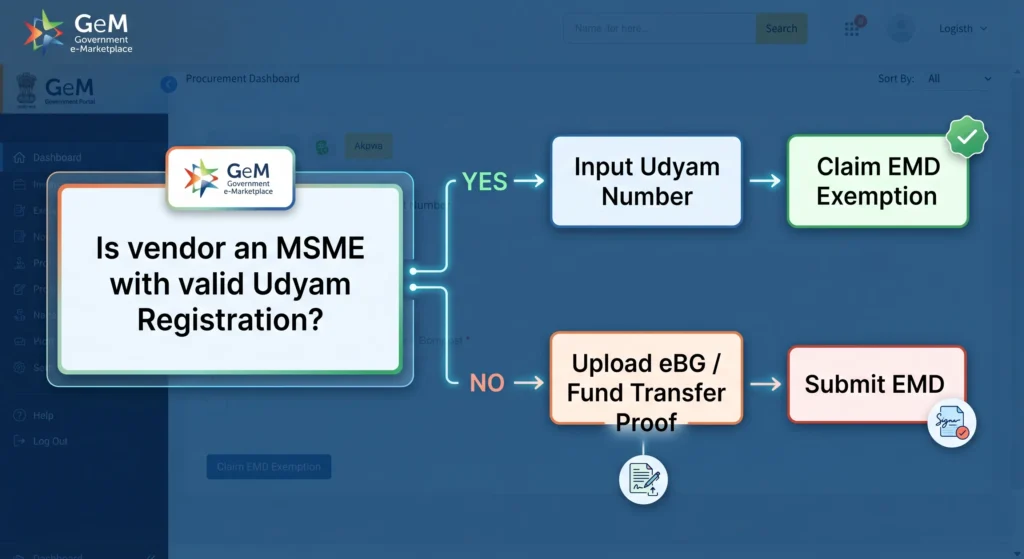
If your enterprise qualifies for an exemption under Public Procurement Policy rules, you must claim it during this specific step. Input your active Udyam Registration number. The system verifies the MSME status via an API link with the Ministry of MSME, checking that your registered activities match the primary category of the bid to grant an automatic EMD exemption.
Step 3.4: Final Encryption and OTP Verification
The final step seals your submission within the secure servers of the portal. Review the generated bid overview sheet to confirm your technical documents and pricing figures are correct.
Click on ‘Verify with DSC’ to append your cryptographic signature to the entire packet. Following successful digital signing, the system triggers a final verification layer by sending a one-time password (OTP) to the mobile number linked with your Aadhaar card. Input this OTP to encrypt, lock, and submit your bid package.
Critical Rules for Submitting a Bid Successfully
Sellers must navigate strict gem rules for bidding to prevent automated system rejections or manual exclusions by evaluation committees. Reviewing and conforming to all specific gem bid terms and conditions outlined in the primary tender document is mandatory.
- Strict Document Clartiy: Uploading blurry, low-resolution, or password-protected PDFs triggers immediate technical rejection. Evaluation officers do not request clarifications for unreadable documentation.
- Category Code Alignment: Ensure your offered product or service matches the exact category code assigned to the tender. Mapping a product from an incorrect or loosely related category causes automated system mismatch failures.
- Bid Split Criteria Compliance: Many public bids incorporate split criteria where the contract volume is divided among multiple low bidders (such as an L1, L2, and L3 split) to support MSME capacities. Review these split parameters during your pre-bid analysis to assess your true volume commitments.
The user interface and mandatory input workflows adapt dynamically based on the specific procurement method chosen by the buyer. Sellers must match their internal pricing models and document preparation to the different types of bid on GeM portal because direct purchases, custom tenders, and reverse auctions all enforce different automated validation rules during the final submission.
How to Check GeM Bid Status After Submission
Your administrative responsibilities continue after completing the OTP verification step. Tracking your ongoing gem bid status helps you prepare for upcoming evaluation milestones or potential price matches.
To find your submitted tenders, log in, navigate to the main dashboard, select the ‘Bids’ header link, and choose the ‘Submitted Bids’ option.
Dashboard -> Bids -> Submitted Bids -> Track Status
This portal interface tracks your submission through its post-opening milestones:
| Post-Submission Milestone | Portal Activity & Status Details |
| Technical Evaluation Phase | The buyer’s committee opens and reviews all uploaded documentation. The portal displays a transparent summary list detailing which participating vendors are technically qualified or disqualified. |
| Financial Evaluation Phase | The portal automatically decrypts and opens the pricing modules of technically qualified vendors, organizing them from the lowest price (L1) to highest price. |
| Reverse Auction (RA) Transition | Buyers frequently choose to convert standard competitive bids into electronic Reverse Auctions. If triggered, your status shifts to an active RA, opening a time-bound window where you can lower your prices in real time against anonymous competitor actions. |
| Final Order Award | The portal issues an automated notification showing the formal award of the contract to the successful bidder, generating a contract reference number. |
Frequently Asked Questions About GeM Portal Bidding
How many days is a bid valid for on the GeM portal?
The standard validity period for a product bid on the GeM portal is 90 days from the date of technical bid opening. For service-related bids, this validity baseline typically extends to 180 days. Buyers can formally request an online extension of this validity period from participating sellers if evaluation processes face delays.
Can a seller withdraw or modify a bid after submission on GeM?
Yes, sellers retain the right to modify or completely withdraw a submitted bid, provided they act before the final bid submission end date and time. Once the official clock hits the deadline, the portal locks all files and pricing units, preventing any alterations or withdrawals.
What happens if a technical document gets rejected on GeM?
If a buyer’s evaluation committee rejects an uploaded technical document, the seller receives an automated notification outlining the reasons for disqualification. The portal opens a mandatory clarification window (usually 48 to 72 hours) allowing the seller to upload rectified documents or challenge the rejection before the final financial opening occurs.
Is EMD mandatory for all MSMEs during GeM bidding?
No, EMD is not mandatory for MSMEs, provided they hold a valid Udyam Registration certificate covering the specific category of goods or services being procured. Sellers must select the exemption option during the portal submission sequence and upload their Udyam registration document to secure this exemption.
What is the difference between a direct bid and a bunch bid on GeM?
A direct bid involves procurement targeting a single product or service category with explicit line-item quantities. A bunch bid allows a buyer to group multiple related items or varied service requirements from distinct categories into a single, comprehensive tender package, requiring the seller to bid on all included items simultaneously.
How do sellers participate in a bid on GeM?
To participate in a bid on GeM, sellers must complete their profile verification, maintain an active DSC, meet bid eligibility criteria, upload required technical documents, enter commercial pricing, complete EMD requirements (if applicable), and submit the bid using DSC and OTP verification before the deadline.