
To win government tenders on the GeM portal, businesses must successfully pass a two stage evaluation process consisting of technical qualification and competitive financial bidding. Winning contracts requires strict adherence to technical compliance, utilizing seller purchase preferences, and offering a strategically priced financial bid to secure the lowest eligible price ranking.
The Government e-Marketplace portal simplifies public procurement for suppliers. GeM tenders are one of the most reliable sources of government revenue, with the platform crossing over Rs. 4 lakh crore in Gross Merchandise Value in FY 2024-25.
However, securing a contract requires a precise understanding of the portal rules, timelines, and document verification steps. This comprehensive guide breaks down the exact bidding process to help your business secure government contracts successfully.
Why Participate in Government Tenders?
Government tenders provide significant opportunities for businesses to:
- Generate Revenue: Securing contracts can ensure a steady income stream.
- Enhance Experience: Completing government projects boosts credibility.
- Build Reputation: Working with government agencies establishes trust and reliability.
- Clear Eligibility Criteria: Most government tenders on GeM specify minimum requirements like GST registration, PAN, Udyam/MSME certificate, and financial capacity. Meeting these eligibility norms ensures smooth participation.
As per P.K. Singh, CEO of GeM, the platform achieved ₹ 1 lakh crore in Gross Merchandise Value (GMV) in FY 2022-23, making it an attractive option for businesses.
How Government Procurement Works on GeM Portal
Before you start bidding, you need to understand how government buyers actually purchase on the GeM portal. The procurement mode depends entirely on the order value.
| Order Value | Purchase Mode | What It Means for Sellers |
|---|---|---|
| Below Rs. 25,000 | Direct Purchase | If your product is L1 (lowest price), buyer can order without any bidding |
| Rs. 25,000 to Rs. 5 Lakh | L1 Comparison | Buyer compares minimum 3 sellers and must select the lowest price |
| Above Rs. 5 Lakh | Bid / Reverse Auction | Full bidding or RA process is mandatory |
This is important because your strategy changes based on the value of the tender. For direct purchases, maintaining the lowest catalogue price matters most. For high-value bids above Rs. 5 lakh, technical compliance and documentation quality become equally important alongside price.
The Government e-Tendering Process
The official portal follows a transparent, electronic workflow designed to eliminate manual intervention. Understanding this sequence allows suppliers to prepare their documentation well before a bid opens.
- Tender Publication: Government buyers publish a detailed bid or Reverse Auction notice on the portal outlining their specific requirements.
- Technical Specification: The bid document details the exact product parameters, quantities, delivery locations, and strict eligibility criteria.
- Bid Submission: Eligible sellers submit their comprehensive technical and financial bids through their secure vendor dashboard.
- Technical Bid Evaluation: The buyer opens and reviews the technical documents. Sellers who fail to meet any criteria are disqualified at this stage.
- Financial Bid Opening: The portal automatically opens the financial pricing quotes of only the technically qualified sellers.
- L1 Ranking and Award: The system automatically ranks suppliers based on pricing. The contract is typically awarded to the lowest eligible bidder.
Steps to Win Tenders on the GeM Portal
Winning a tender on GeM involves meticulous preparation and execution. Applying for a tender on the GeM portal is a structured process. Here is a step-by-step guide:
Step 1: Login to GeM Dashboard Use your registered seller credentials and navigate to the “Bid/RA” section on your dashboard.
If you are not yet registered, read our complete guide on How to Register on GeM Portal before proceeding.
Step 2: Search for Relevant Tenders Enter keywords, product category, or service type to filter tenders that match your business. Also check for Custom Bids and Bunch Bids that do not appear in standard category searches. For a detailed approach, read our guide on How to Search Tenders in GeM Portal.
Step 3: Read the Tender Notice Carefully Download and read the full bid document. Understand the scope of work, eligibility criteria, technical specifications, delivery timelines, and payment terms before filling anything.
Step 4: Fill the Tender Form Enter technical specifications, complete all compliance declarations, and confirm your product or service matches the buyer’s requirements. Be precise with every field.
Step 5: Upload Supporting Documents Upload all required documents including GST certificate, PAN, Udyam registration, certifications, and OEM authorization if applicable. Use a checklist to avoid missing anything, as incomplete documents lead to disqualification.
Step 6: Pay EMD If Applicable Some tenders require an Earnest Money Deposit before bid submission. MSMEs with valid Udyam registration are often exempt. To understand how EMD works and when it is refunded, read our detailed guide on EMD in GeM Portal.
Step 7: Submit Financial Quote Add your unit price for each item. This determines your L1, L2, or L3 ranking. Factor in GST, delivery charges, and your profit margin before entering the final price. To understand all bid formats including Bid to RA and BOQ bids, refer to our guide on Types of Bids on GeM Portal.
Step 8: Review and Submit Double-check all details, verify uploaded documents are readable, and confirm the financial quote is accurate. Once submitted, most fields cannot be edited.
If you are new and unsure about filling tender forms on GeM, we are the best GeM Tender Consultants and can guide you step by step. Want to win tenders without going deep into the process? Consult with us today.
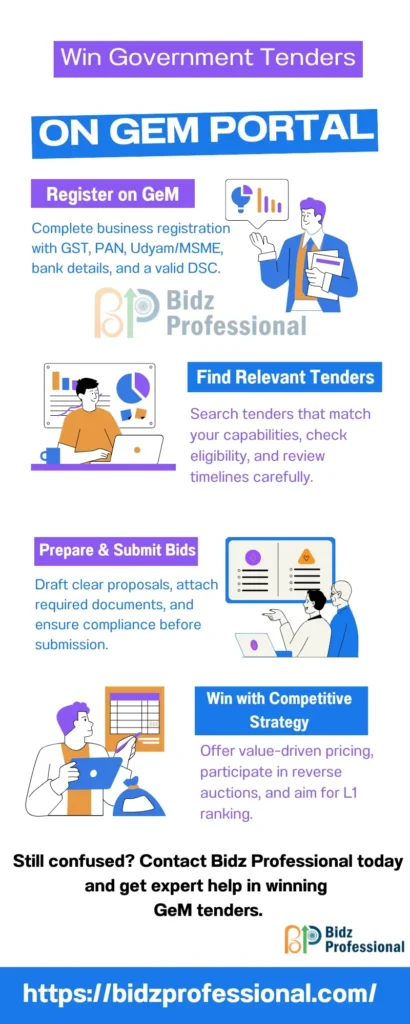
1. GeM Portal Registration
Start by registering your business on the GeM portal. Here’s what you need:
| Requirement | Description |
|---|---|
| Business Registration | GST, PAN, and Udyam Registration (if applicable). |
| Bank Details | Active bank account linked to your business. |
| Product/Service Catalog | Comprehensive descriptions and specifications. |
| Digital Signature Certificate | For secure online transactions. |
Once registered, you can browse relevant tenders and start bidding.
2. Find Relevant Tenders
Spend time searching for tenders that match your business capabilities. Look for:
- Scope of Work: Understand the requirements and deliverables.
- Eligibility Criteria: Ensure your business qualifies.
- Timelines: Confirm your ability to meet deadlines.
3. Prepare Your Proposal
Your proposal is a key determinant of success. Here’s how to make it impactful:
- Be Specific: Address the tender’s requirements in detail.
- Highlight Your USP: Emphasize your competitive pricing, quality, or customer service.
- Provide References: Choose references who can vouch for your reliability.
4. Comply with Documentation
Ensure all required documents are in place. Common documents include:
- Certifications (e.g., ISO, MSME).
- Financial statements.
- Past project details.
Use a checklist to avoid missing any essential documents.
5. Offer Competitive Pricing
Competitive pricing doesn’t mean the lowest bid but offering value for money. Consider:
- Bulk discounts.
- Cost-effectiveness.
- Additional value-added services.
6. Understand Tender Terminology
Familiarize yourself with common terms like:
- Request for Proposal (RFP): Detailed tender announcement.
- Consortium: Partnership between companies to meet eligibility.
- L1, L2, L3: Lowest bidders in descending order.
- Earnest Money Deposit (EMD): Refundable deposit submitted with the tender.
- Mobilization Advance: Pre-production funds for contract winners.
L1 Comparison: In GeM tenders, bidders are ranked as L1, L2, L3, etc., based on quoted prices. The L1 bidder (Lowest Price) usually wins the contract, provided they also meet all technical and eligibility requirements. Businesses must balance competitive pricing with profitability to secure L1 without losses.
7. Participate in Reverse Auctions
Reverse auctions on GeM allow sellers to adjust bids based on competition. Tips for success:
- Monitor competitors’ bids.
- Use the Auto Bid feature for real-time adjustments.
- Set a price floor to avoid losses.
To understand all bid formats including Bid to RA and BOQ bids, refer to our guide on Types of Bids on GeM Portal.
8. Review Before Submission
Before submitting your tender response:
- Double-check all details.
- Proofread for errors.
- Run it past a partner or authorised personnel for validation.
Tips to Improve Your Chances
- Research the Buyer: Understand their requirements and priorities.
- Analyze Competitors: Compare your strengths and weaknesses.
- Value Proposition: Ensure your bid offers value for money.
- Highlight Experience: Showcase successful past projects.
- Deliver Quality: Commit to high-quality deliverables to build a strong reputation.
Common Challenges and Solutions
Pre-Tender Meetings on GeM Portal
Sometimes, buyers conduct pre-tender meetings on the GeM portal. These sessions clarify doubts, eligibility criteria, and technical requirements before bid submission.
Attending these meetings helps vendors:
- Understand buyer expectations clearly.
- Avoid mistakes in tender documentation.
- Increase chances of qualifying in technical evaluation.
If you’re serious about winning government tenders, make sure you do not skip pre-bid meetings whenever they are available.
| Challenge | Solution |
| Intense Competition | Focus on quality and differentiation. |
| Complex Documentation | Maintain a checklist and organize records. |
| Pricing Pressures | Balance competitiveness with profitability. |
| Technological Barriers | Invest in training and support tools. |
FAQs
Q1. What is the bidding process in GeM portal?
The bidding process on GeM involves four stages: technical bid submission, technical evaluation by the buyer, financial bid opening, and L1 selection. Only sellers who clear technical evaluation have their prices compared. The seller with the lowest price (L1) is awarded the contract, provided all documents are in order.
Q2. How do I fill a tender form on GeM portal?
To fill a tender form on GeM, log in to your seller dashboard, go to the Bid/RA section, open the relevant bid, fill in technical specifications and compliance details, upload supporting documents, enter your financial quote, pay EMD if applicable, and submit before the deadline.
Q3. What documents are needed for a GeM tender?
he standard documents required for a GeM tender include GST certificate, PAN, Udyam/MSME registration, ISO or quality certifications, OEM authorization (for resellers), past order experience, and performance certificates. Requirements vary by tender.
Q7. How do I find relevant tenders on GeM portal?
Use the Bid/RA section in your seller dashboard and filter by product category, location, value, and department. Also watch out for Custom Bids and Bunch Bids that do not appear in standard searches.
Conclusion
Winning government tenders on the GeM portal is a strategic process that involves understanding the tender application process, filling tender forms correctly, and competing effectively for L1 ranking.
By following the outlined steps, you can enhance your chances of success. Remember, the key is to align your capabilities with government requirements and offer unmatched value.
Start bidding smartly today and pave the way for your business growth in the government procurement ecosystem.
Contact Bidz Professional today let’s scale your business with the government tenders.