
GeM grievance redressal for sellers runs mainly through the portal’s Incident Management system. After a contract is placed, the seller opens Need Help, selects Report an Incident, chooses the buyer and describes the problem. The two sides get a short window to settle it between themselves, and if that fails the incident can be escalated to GeM Admin, who issue a show cause notice, look at the evidence from both sides and decide. A seller who disagrees with a penalty can file one appeal. Payment disputes have extra routes outside the portal, such as MSME Samadhaan and CPGRAMS, and the GeM helpdesk handles account and technical complaints. This post walks through each route in the order a seller would actually use it.
What the Incident System Is Built to Do
Before filing anything, it helps to know what kind of body you are dealing with. GeM does not work like a court or an arbitrator. Its incident policy is designed to catch deviations from GeM rules and contract terms, such as non-delivery, wrong specifications, misdeclared certificates or a bid withdrawn after the window. The actions the policy lists are notices, suspensions of a product or category, and effects on the seller’s rating. In the version of the incident management policy we reviewed, there is no power to award damages or order a buyer to pay. The policy also says that its administrative action does not limit any legal or contractual remedy, and that GeM is not a party to those proceedings.
That shapes how a seller should use it. An incident is a good tool when the buyer has broken a GeM rule or the contract terms and you want GeM’s attention on it. It is a weaker tool for recovering money, where the routes further down this post matter more.
Raising the Incident, Before and After a Contract
The route depends on where you are in the order.
Before a contract exists. If the problem is with a catalogue listing, such as a copied product page or a misleading entry, open the product page and use the Report this Product option.
After a contract is placed. Go to Need Help, choose Report an Incident, pick the buyer from the dropdown and select the contract the problem relates to. GeM’s seller FAQ notes that for bid related issues the incident can be raised once the technical round has started.
Two habits at this stage save trouble later. Reply to everything on the Incident Management dashboard, not by email, because the policy expects responses to be recorded there. And keep names, phone numbers and organisation details out of the text, since the policy asks parties not to include identifying details in their responses. Describe what happened, with dates and document references, and leave it at that.
What Happens in the Days After Filing
The first stage is a settlement window. GeM’s seller FAQ describes about 7 days from creation for buyer and seller to resolve the matter, and says an incident raised against a buyer can be escalated to GeM Admin after those 7 days. You get an email prompt when escalation becomes available. For incidents tied to a bid or an order, the two sides can also send each other a mutual closure request, which is the cleanest ending if the buyer agrees to fix the issue.
If the matter is escalated, the party named in the incident receives a show cause notice.
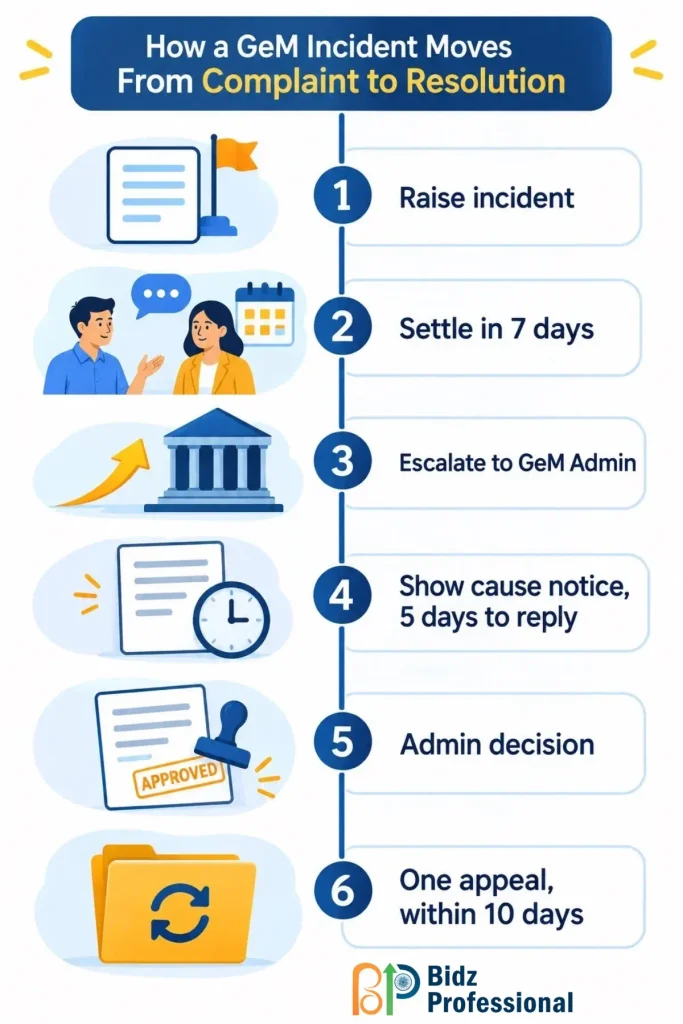
The response period under the policy is 5 calendar days. GeM Admin can ask for further clarification, review the comments and documents both sides uploaded, and then decide. The decision rests on what is on the dashboard, so anything you did not upload effectively does not exist for the reviewer.
Timelines inside the policy get revised from time to time, and the FAQ page and the policy document do not always match on small details. Treat the figures here as the version we reviewed, and read the current policy before you plan around a specific day count.
Writing the Incident So It Gets Read
These are working habits, not rules from the policy, but they make a visible difference to how fast a reviewer can reach a view.
- State the contract number, the date of the event and the exact clause or specification that was not followed.
- Attach the proof in the same message: delivery challan, signed receipt, inspection report, the buyer’s own message on the portal.
- Keep to one problem per incident. A complaint about a rejected consignment and a complaint about a late payment belong in separate incidents.
- Write as if the reader has never seen the order. The person reviewing will often be reading it cold.
- Ask for one specific outcome, such as acceptance of the consignment or release of the pending certificate.
When It Goes the Other Way: Notices, Suspensions and Appeals
Buyers raise incidents against sellers too, and a seller who ignores one pays for it. The policy sorts deviations into mild, serious, severe and grave. A listing in the wrong category is the example for mild. Non-delivery or substandard supply falls under serious. Misdeclared certifications or brand misrepresentation are severe, and counterfeit goods or fake documents are grave.
If a seller does not answer a show cause notice within 5 days, the seller is automatically notified for serious deviations or watch-listed for severe and grave ones, starting from the 6th day. The consequence is narrower than many sellers fear. For a serious deviation, the affected product or service is suspended for future transactions. For severe and grave ones, the related category is suspended. Other activity on your account continues. In the policy version we reviewed, suspension periods run from 30 days for a first serious deviation to as much as 90 days for repeated grave ones, with longer periods possible in repeat cases.
Sellers with a good fulfilment record get some protection. The policy reduces the penalty to between 30 and 50 percent of the standard amount where fulfilment is above 90 percent, provided the seller has at least 10 accepted contracts in the past year and not more than two incidents for the same reason in the last 30 days.
The deviation also shows up in your rating, which feeds the seller rating and performance score that buyers look at when comparing sellers. A suspension ends, but a weak rating takes longer to recover.
Appeal. A seller can appeal a penalty once per incident, within 10 calendar days of the penalty, and only with additional evidence that was not considered earlier. The fee is 5 percent of the contract value, with a minimum of Rs 1,000 and a maximum of Rs 10,000, and it is refunded if the appeal succeeds. Your status stays unchanged while the appeal is pending.
Penalty and Cancellation Disputes: Argue the Clause, Not the Feeling
Many seller complaints begin with a penalty or a cancelled order that the seller thinks was unfair. These disputes usually turn on what the contract’s delivery and SLA terms actually allowed, so match the buyer’s action to the specific clause before you write anything. If the delay came from the consignee, such as no one available to receive the goods, say so with the date and the proof. A complaint that quotes the clause and attaches the evidence gets treated very differently from one that says the buyer was unreasonable.
Payment Disputes: Where the Portal Stops
A stuck payment is a different problem from a delivery complaint. Before raising anything, check where the order sits in the CRAC and bill submission cycle, because many delayed payments are waiting on a certificate or a mismatched invoice, not a buyer who is refusing to pay. If the paperwork is clean and the delay continues, there are three routes outside a plain incident.
- Escalate through GeM. Raise an incident and escalate it after the settlement window, with the CRAC and invoice attached.
- CPGRAMS. The Centralised Public Grievance Redress and Monitoring System lets you lodge a grievance against a government department, which is useful when the buyer is a central government office.
- MSME Samadhaan. Micro and Small Enterprises can file a delayed payment case on this portal. Under the MSMED Act, payment is due within the agreed period, which cannot exceed 45 days, and delayed amounts carry interest at three times the bank rate notified by the RBI, compounded monthly. Your Udyam registration needs to be in place for this to work, so check the current rules before you file. This is general information, not legal advice.
Reaching GeM Seller Support Directly
Not every problem needs an incident. Login trouble, a failed upload, a profile that will not update or a question about a rule belongs with the helpdesk. From GeM’s contact page, the main channels are:
- Toll free numbers 1800-419-3436 and 1800-102-3436, 9:00 am to 10:00 pm, Monday to Saturday
- Email at helpdesk-gem@gov.in
- Support tickets, raised and tracked at gem.gov.in/gemtickets
Vendor assessment and exemption queries go to a separate desk run by the assessment agency, with its own email, gem.helpdesk@rites.com, and phone line. Sending an assessment question to the general helpdesk usually just bounces it back to this desk and costs you days.
GeM also runs a Vivad se Vishwas facility, with its own option on the helpline and a course in the seller e-learning track. If your dispute is about an older contract, ask the helpline whether it applies to you, since eligibility depends on the scheme’s own terms.
When Legal Remedies Come Into the Picture
Because GeM’s own process does not award money, a large unpaid contract may eventually need a legal route. Your contract and the bid’s terms and conditions will say how disputes are meant to be handled, so read those before deciding. Sellers sometimes assume that raising an incident uses up their legal options. The policy says the opposite, that administrative action does not limit legal or contractual remedies. For a significant amount, speak to a lawyer who has handled government contract matters, and keep your incident history, since it forms a useful paper trail.
Evidence to Keep for Every Order
- Purchase order and contract copy, with the delivery and SLA terms marked
- Dispatch proof, delivery challan and signed receipt
- Every message exchanged with the buyer on the portal
- CRAC, invoice and e-way bill where applicable
- Screenshots of the order status on the days that matter
- A dated log of calls, since phone conversations leave no record otherwise
Conclusion
GeM gives sellers a real process for complaints, but it works best when you know its limits. The Incident Management system is strong at drawing marketplace attention to a buyer’s or seller’s deviation, and weaker at recovering money, where Samadhaan, CPGRAMS and legal routes matter more. Sellers who document each order, raise a clear and single issue, respond inside the notice period and use the appeal window sensibly tend to come out of disputes with their account and rating intact.
Frequently Asked Questions
1. When can a seller escalate an incident against a buyer to GeM Admin?
GeM’s seller FAQ says an incident raised against a buyer can be escalated after 7 days from creation. The system sends an email when escalation becomes available.
2. Can I reply to an incident by email or phone?
Responses are meant to go on the Incident Management dashboard, where the reviewer can see them. The policy also asks parties not to include names, phone numbers or organisation details in the text, so keep the message factual.
3. Does an incident against me suspend my whole GeM account?
Not under the policy version we reviewed. For serious deviations the affected product or service is suspended, and for severe and grave ones the related category is suspended, while other activity on the account continues.
4. What can I do if I think a penalty is wrong?
File an appeal within 10 calendar days, once per incident, with new evidence that was not considered before. The fee is 5 percent of the contract value, between Rs 1,000 and Rs 10,000, and it is refunded if you win.
5. Does raising an incident stop me from taking legal action later?
No. The policy states that its administrative action does not limit legal or contractual remedies, and that GeM is not a party to such proceedings. For large amounts, take advice from a lawyer who handles government contracts.